Private Sub TextBox3_KeyPress(ByVal sender As Object, ByVal e As System.Windows.Forms.KeyPressEventArgs) Handles TextBox3.KeyPress
If Asc(e.KeyChar) < 65 Or Asc(e.KeyChar) > 90 AndAlso Asc(e.KeyChar) < 97 Or Asc(e.KeyChar) > 122 Then
MessageBox.Show("Only Letters")
e.Handled = True
ElseIf Asc(e.KeyChar) = 8 Then
e.Handled = False
End If
End Sub
Thursday, December 15, 2011

Allow only LETTERS and Backspace in a textbox
Private Sub TextBox4_KeyPress(ByVal sender As Object, ByVal e As System.Windows.Forms.KeyPressEventArgs) Handles TextBox4.KeyPress
If (e.KeyChar >= "a" And e.KeyChar = "A" And e.KeyChar
e.Handled = False
Else
e.Handled = True
MessageBox.Show("Only Letters")
End If
End Sub
If (e.KeyChar >= "a" And e.KeyChar = "A" And e.KeyChar
e.Handled = False
Else
e.Handled = True
MessageBox.Show("Only Letters")
End If
End Sub
Allow NUMBERS, BACKSPACE and a DOT in a textbox
Private Sub TextBox1_KeyPress(ByVal sender As Object, ByVal e As System.Windows.Forms.KeyPressEventArgs) _
Handles TextBox1.KeyPress
'There are a couple scenerios this code is looking for. One is checking for the Decimal period "."
'and whether it exists in the textbox already. The other is seeing if the keypress was a Number and
'Control based key.
If e.KeyChar = "." Then
'If a value higher than -1 is returned, it means there IS a existing decimal point’
If TextBox1.Text.IndexOf(".") > -1 Then
'This says that I already dealt with the _KeyPress event so do not do anything else with this event.
e.Handled = True
End If
'Remember you want numbers to get through and the Control keys like “Backspace”
ElseIf Char.IsNumber(e.KeyChar) = False AndAlso Char.IsControl(e.KeyChar) = False Then
'This says that I already dealt with the _KeyPress event so do not do anything else with this event.
e.Handled = True
End If
End Sub
Handles TextBox1.KeyPress
'There are a couple scenerios this code is looking for. One is checking for the Decimal period "."
'and whether it exists in the textbox already. The other is seeing if the keypress was a Number and
'Control based key.
If e.KeyChar = "." Then
'If a value higher than -1 is returned, it means there IS a existing decimal point’
If TextBox1.Text.IndexOf(".") > -1 Then
'This says that I already dealt with the _KeyPress event so do not do anything else with this event.
e.Handled = True
End If
'Remember you want numbers to get through and the Control keys like “Backspace”
ElseIf Char.IsNumber(e.KeyChar) = False AndAlso Char.IsControl(e.KeyChar) = False Then
'This says that I already dealt with the _KeyPress event so do not do anything else with this event.
e.Handled = True
End If
End Sub
Date and Time Difference user interface:
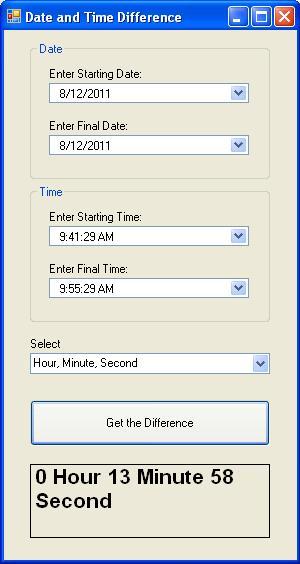


here is the CODE:
Public Class frmDateandTimeDifference
Private Sub btnGettheDifference_Click(ByVal sender As System.Object, ByVal e As System.EventArgs) Handles btnGettheDifference.Click
Dim Diff1, Diff2, Diff3 As Long
Select Case cboSelect.SelectedIndex
Case 0
Diff1 = DateDiff(DateInterval.Year, dtpStartDate.Value, dtpEndDate.Value)
Diff2 = DateDiff(DateInterval.Month, dtpStartDate.Value, dtpEndDate.Value)
Diff3 = DateDiff(DateInterval.Day, dtpStartDate.Value, dtpEndDate.Value)
lblOutput.Text = Diff1 & " Year/s " & Diff2 & " Month/s " & Diff3 & " Day/s "
Case 1
Diff1 = DateDiff(DateInterval.Hour, dtpStartTime.Value, dtpEndTime.Value)
Diff2 = DateDiff(DateInterval.Minute, dtpStartTime.Value, dtpEndTime.Value)
Diff3 = DateDiff(DateInterval.Second, dtpStartTime.Value, dtpEndTime.Value)
lblOutput.Text = Diff1 & " Hour/s " & Diff2 & " Minute/s " & Diff3 & " Second /s "
End Select
End Sub
Private Sub frmDateandTimeDifference_Load(ByVal sender As System.Object, ByVal e As System.EventArgs) Handles MyBase.Load
cboSelect.Items.Add("Year, Month, Day")
cboSelect.Items.Add("Hour, Minute, Second")
End Sub
Private Sub Label6_Click(ByVal sender As System.Object, ByVal e As System.EventArgs) Handles Label6.Click
Me.Close()
End Sub
End Class
**Run and Save the program.....
Proper Case
1. Proper Case user interface:

2. Code....
Public Class frmProperCase
Private Sub btnConvert_Click(ByVal sender As System.Object, ByVal e As System.EventArgs) Handles btnConvert.Click
txtProperCase.Text = Microsoft.VisualBasic.StrConv(txtInput.Text, VbStrConv.ProperCase)
End Sub
Private Sub Label2_Click(ByVal sender As System.Object, ByVal e As System.EventArgs) Handles Label2.Click
Me.Close()
End Sub
End Class
3. Save and RUN the program...

2. Code....
Public Class frmProperCase
Private Sub btnConvert_Click(ByVal sender As System.Object, ByVal e As System.EventArgs) Handles btnConvert.Click
txtProperCase.Text = Microsoft.VisualBasic.StrConv(txtInput.Text, VbStrConv.ProperCase)
End Sub
Private Sub Label2_Click(ByVal sender As System.Object, ByVal e As System.EventArgs) Handles Label2.Click
Me.Close()
End Sub
End Class
3. Save and RUN the program...
Character Count
1. Character Count user interface:

2. The Code....
Public Class frmCharacterCount
Private Sub btnClickHereToCount_Click(ByVal sender As System.Object, ByVal e As System.EventArgs) Handles btnClickHereToCount.Click
Dim length, x, count As Integer
Dim letter As String
length = Microsoft.VisualBasic.Len(txtPhrase.Text)
For x = 1 To length
letter = Microsoft.VisualBasic.Mid(txtPhrase.Text, x, 1)
If Microsoft.VisualBasic.StrComp(letter, txtcharacter.Text, CompareMethod.Text) = 0 Then
count = count + 1
End If
Next
lblOutput.Text = "There are " & count & " " & txtcharacter.Text & " in the Phrase."
End Sub
Private Sub exit_Click(ByVal sender As System.Object, ByVal e As System.EventArgs) Handles exit.Click
Me.Close()
End Sub
End Class
3. Save and RUN the program...

2. The Code....
Public Class frmCharacterCount
Private Sub btnClickHereToCount_Click(ByVal sender As System.Object, ByVal e As System.EventArgs) Handles btnClickHereToCount.Click
Dim length, x, count As Integer
Dim letter As String
length = Microsoft.VisualBasic.Len(txtPhrase.Text)
For x = 1 To length
letter = Microsoft.VisualBasic.Mid(txtPhrase.Text, x, 1)
If Microsoft.VisualBasic.StrComp(letter, txtcharacter.Text, CompareMethod.Text) = 0 Then
count = count + 1
End If
Next
lblOutput.Text = "There are " & count & " " & txtcharacter.Text & " in the Phrase."
End Sub
Private Sub exit_Click(ByVal sender As System.Object, ByVal e As System.EventArgs) Handles exit.Click
Me.Close()
End Sub
End Class
3. Save and RUN the program...
Button Play
1.A program that will initially display two buttons, the first is enabled and the other is disabled. The behavior will be, once you click the Enabled button, it will be disabled, while the other button (which is disabled) will be enabled.

2. CODE:
Public Class frmButtonPlay
Private Sub btn1_Click(ByVal sender As System.Object, ByVal e As System.EventArgs) Handles btn1.Click
btn1.Enabled = False
btn2.Enabled = True
End Sub
Private Sub btn2_Click(ByVal sender As System.Object, ByVal e As System.EventArgs) Handles btn2.Click
btn2.Enabled = False
btn1.Enabled = True
End Sub
Private Sub backtoindex_Click(ByVal sender As System.Object, ByVal e As System.EventArgs) Handles backtoindex.Click
Me.Close()
End Sub
Private Sub frm2_Load(ByVal sender As System.Object, ByVal e As System.EventArgs) Handles MyBase.Load
btn1.Enabled = True
btn2.Enabled = False
End Sub
End Class
3. Save & Run...

2. CODE:
Public Class frmButtonPlay
Private Sub btn1_Click(ByVal sender As System.Object, ByVal e As System.EventArgs) Handles btn1.Click
btn1.Enabled = False
btn2.Enabled = True
End Sub
Private Sub btn2_Click(ByVal sender As System.Object, ByVal e As System.EventArgs) Handles btn2.Click
btn2.Enabled = False
btn1.Enabled = True
End Sub
Private Sub backtoindex_Click(ByVal sender As System.Object, ByVal e As System.EventArgs) Handles backtoindex.Click
Me.Close()
End Sub
Private Sub frm2_Load(ByVal sender As System.Object, ByVal e As System.EventArgs) Handles MyBase.Load
btn1.Enabled = True
btn2.Enabled = False
End Sub
End Class
3. Save & Run...
Subscribe to:
Posts (Atom)